Tuesday, June 21, 2022

Kool Cool Treats


 Four step-by-step kool, cool treats are available from TpT in 3 formats: Regular, PCS, SymbolStix.

https://teacherspayteachers.com/Store/Bloom/Search:cookies_'n_cream

#AACSLPs #AAC #SLPeeps #AidedLanguageStimulation #SPED #nonverbal #augcomm @PrAACticalAAC @n2yinc #VisualSupports #SLPeeps #SLPs #SLP2B #SpedChat #teachers #disability #SpecialNeeds #autism #cerebralpalsy #Blendedlearning #ATchat #udlchat #edtech #earlyeducation #earlylearning #Assistive Technology #sped @aaccessibleorg @comunicacion.aumentativa @praacticalaac


Wednesday, March 16, 2022

Library of Animated Step-by-Steps®?

  
The current library of Animated Step-by-Steps® includes 274 titles!


Recipe Resources                     70

Poem/Song Resources             107

Science Resources                     25

Story Resources                         11

Craft Resources                        23

Games/Literacy Resources      33

Digital Extension Activities        5


The Bloom Where You're Planted Store (TpT) has been witnessing a considerable 'uptick' in purchases … This is especially notable for Bundled Resources that offer a 20% savings. 

If you are a school/agency serving students with special needs, consider purchasing the complete library of 274 titles for even greater savings (approx. 40%). Contact: cgoossens@me.com

Library Options include:

 1. Regular Library
(No picture symbols) 
$800 for 274 titles  about $3.00  per title (normally retails for $1,370)

2. Symbol-Supported Library – PCS
(Tobii Dynavox)
$900 for 274 titles  about $3.30 per title (normally retails for $1,644)

3. Symbol-Supported Library – SymbolStix
(n2y)
$900 for 274 titles about $3.30 per title (normally retails for $1,644) 

4. VI Library
 (suitable for students with visual impairments)
$180 for 52 titles (normally retails for $312) about $3.50 per title

For  illustrated listings of available Animated Step-by-Steps®, please click on the following links:


…’til the next post … 

Visit my website   http://animatedstep-by-steps.com
Follow me on twitter www.twitter.com/@AnimStepbySteps
Follow me on facebook www.facebook.com/AnimatedStepBySteps
Email me canadiangoosse@gmail.com

©2020 Carol Goossens’, Ph.D.
Augmentative Communication Consultant
Special Educator

Friday, August 20, 2021

Facilitating Baking With Toddlers

 I’ve had great fun using ASbyS poems and songs on my iPad with my young nieces and nephews …. yes, some as young as 18 months!

Sooooo understandably I was thrilled to ‘trip across’ a blog post by Susie Allison (https://busytoddler.com) with an interesting modification that simplifies baking with toddlers while working on simple number concepts. 


The recipe is Yogurt Cake … the modification is using the empty personal size yogurt container (measuring about ½ cup) as the simple unit of measurement for the recipe … 1 container of yogurt (1/2 cup) , 2 containers flour (1 cup), 1 container sugar (1/2 cup) … ). Since the yogurt is usually not filled to the top of the container, I fill the personal size yogurt container to a height comparable to the height of the yogurt.


This animated recipe is available on TpT in three formatsRegular (no symbol support), PCS (Tobii Dynavox, and SymbolStix (n2y)  https://bit.ly/YogurtCake1


The cake is simple and delicious! I like to eat mine with strawberries and whipped cream. 

Can’t wait to make this delightful recipe with my delightful toddler nieces & nephews! 


This resource can be displayed on the 'big screen' (interactive whiteboard, large screen TV using Apple TV) or the 'small screen'  (computer monitor, iPad/Android tablet or iPhone using the free Microsoft PowerPoint app specific to each). Please become a follower of the Animated Step-by-Steps blog to take advantage of several years of using Animated Step-by-Steps® creatively.  http://animatedstepbysteps.blogspot.com


…’til the next post … 


Visit my website   http://animatedstep-by-steps.com

Follow me on twitter www.twitter.com/@AnimStepbySteps

Follow me on instagram https://www.instagram.com/animatedstepbysteps/

Follow my blog http://animatedstepbysteps.blogspot.com

Email me canadiangoosse@gmail.com

Visit my digital store http://teacherspayteachers.com/Store/Bloom


©2021 Carol Goossens’, Ph.D.

Augmentative Communication Consultant

Special Educator


Wednesday, July 21, 2021

Thunder Cake!

Just completed the Animated Step-by-Step recipe for Thunder Cake!


This ASbyS resource is a lovely complement to the story Thunder Cake by Patricia Polacco. The original story is about a little girl who is terrified by thunder. Her Grandma explains that the time between seeing the lightning and hearing the thunder is indicative of the proximity of the storm. The Grandma then distracts the little girl by enlisting her help in making a Thunder Cake and encouraging her to count the diminishing time between the lightning and the thunder clap. The little girl is so distracted by the race to gather and assemble the ingredients and the need to count the time between the  lightning strike and the thunder clap, that she completely loses her fear of the thunder. 

 To reinforce a ‘science agenda’ within this recipe resource, I have embedded a series of ‘lightning and thunder’ animated slides that map the approach of an imaginary storm. By the time the cake is baked and frosted, the lightning and the thunder are almost simultaneous … The storm has arrived and the cake is done!


As always, there are three versions of this resource: Regular, PCS, and SymbolStix 

This resource can be displayed on the 'big screen' (interactive whiteboard, large screen TV using Apple TV) or the 'small screen' (computer monitor, iPad/Android tablet or iPhone using the free Microsoft PowerPoint app specific to each). 

 …’til the next post … 

Visit my website http://animatedstep-by-steps.com 
Follow me on twitter www.twitter.com/@AnimStepbySteps 
Follow me on instagram https://www.instagram.com/animatedstepbysteps/ 
Follow my blog http://animatedstepbysteps.blogspot.com 
Email me canadiangoosse@gmail.com 
Visit my digital store http://teacherspayteachers.com/Store/Bloom

 ©2021 Carol Goossens’, Ph.D. 
Augmentative Communication Consultant 
Special Educator

Thursday, March 25, 2021

Different Packaging? ... Make It Into a Literacy Teachable Moment

There are definitely regional differences in food products across the country. Packaged food products might not look the same in different parts of the country but they are typically labelled with text that confirms that we are indeed working with the intended product. Obviously if you are using an ASbyS in a non-English speaking country you might want to customize the resource with images of your products labeled in your language. This can be easily achieved by right clicking (control click) on the resource image … select the Change Picture command … and navigate to where your product resides (created as a .png with a transparent background).
When selecting images to depict food products such as flour, sugar, baking powder, baking soda, cocoa I typically strive to include images where the confirming text is highly visible on the product. This sets the stage nicely for a teachable, literacy moment and another instance of highlighting the importance of learning to read. "It doesn't look the same as our package. Let's look closer … I think that says … f-l-o-u-r. What do you think? ... the same?" You can enlarge the screen to 'zero in on' the text or use the PowerPoint pen tool (command p while in slide show mode on the Mac) to underline or circle the text on the product.
…’til the next post … Visit my website http://animatedstep-by-steps.com Visit my digital store http://teacherspayteachers.com/Store/Bloom Follow me on twitter www.twitter.com/@AnimStepbySteps Follow me on instagram https://www.instagram.com/animatedstepbysteps/ Follow my blog http://animatedstepbysteps.blogspot.com Email me canadiangoosse@gmail.com ©2020 Carol Goossens’, Ph.D. Augmentative Communication Consultant Special Educator

Saturday, December 19, 2020

Video of Amazing Dog Tricks Animated Step-by-Step

This resource is available through Teachers Pay Teachers in 3 formats: Regular, PCS & SymbolStix https//teacherspayteachers.com/Store/Bloom

Monday, November 16, 2020

Video of My Little Wagon - An Animated Step-by-Step Resource


This video simulates the interactive use of the Animated Step-by-Step resource,  My Little Wagon.  This resource is a available from Teachers Pay Teachers in 3 formats: Regular (no symbol support), PCS and SymbolStix.  Both complex (Reg, PCS, SymStix) and simple versions (Reg, PCS, SymStix) are available. The Complex versions simultaneously target several descriptors  (e.g. big red ball vs big yellow truck); the Simple versions  target one item at a time, e.g. just size, or just color, or just the requested item. 


…’til the next post … 


Visit my website   http://animatedstep-by-steps.com

Follow me on twitter www.twitter.com/@AnimStepbySteps

Follow me on facebook www.facebook.com/AnimatedStepBySteps

Follow me on instagram https://www.instagram.com/animatedstepbysteps/

Follow my blog http://animatedstepbysteps.blogspot.com

Email me canadiangoosse@gmail.com

Visit my digital store http://teacherspayteachers.com/Store/Bloom


©2020 Carol Goossens’, Ph.D.

Augmentative Communication Consultant

Special Educator

Friday, November 13, 2020

Video of Goldilocks & the Three Bears - An Animated Step-by-Step Resource


Goldilocks and the Three Bears is available from Teachers Pay Teachers in 4 formats: Regular (no symbol support), PCS (Tobii Dynavox), SymbolStix (n2y) and VI (a high contrast version designed to better address the needs of students with visual challenges, although it does seem to work equally well with some students on the Autism Spectrum)


…’til the next post … 


Visit my website   http://animatedstep-by-steps.com

Follow me on twitter www.twitter.com/@AnimStepbySteps

Follow me on facebook www.facebook.com/AnimatedStepBySteps

Follow me on instagram https://www.instagram.com/animatedstepbysteps/

Follow my blog http://animatedstepbysteps.blogspot.com

Email me canadiangoosse@gmail.com

Visit my digital store http://teacherspayteachers.com/Store/Bloom


©2020 Carol Goossens’, Ph.D.

Augmentative Communication Consultant

Special Educator

Video of Little Red Riding Hood - An Animated Step-by-Step Resource


This Little Red Riding Hood Animated Step-by-Step Resource can be purchased in Teachers Pay Teachers in 4 formats: Regular, PCS, SymbolStix and VI.


What Happened to the Wolf?

 Fairy tales (Goldilocks & the 3 Bears, The Three Little Pigs The Gingerbread Boy, The Little Red Hen, Little rRed Riding Hood) have considerable longevity and although the story line may vary somewhat with time,  the moral lessons remain intact. 


Little Red Riding Hood is the most recent addition to my roster of Animated Step-by-Step Fairy Tales ... joining the ranks of The 3 Little Pigs and Goldilocks & the 3 Bears.


I often struggle with the issue of incorporating 'death" when rendering an Animated Step-by-Step for preschoolers. In Little Red Riding Hood, for example, … What happened to the grandma? Did the wolf eat her or did she escape? In my version she conveniently escaped with her walker … Did the woodsman kill the wolf or tranquilize it and take it to another part of the forest? Although my version, includes a page depicting a dead wolf with a victorious woodsman, this page can be easily altered if you want a 'kinder, gentler' story line. 

There are two options for the 'kinder, gentler' version:

Option 1:

1.     Select the grouped graphics (woodsman + dead wolf + Red Riding Hood) 

2.     Sub-select the wolf within the group (click on the tongue).

3.     Delete the wolf and you will find a log conveniently hidden beneath the wolf. 


O    Option 2:

Just swap out page 14 with the  'kinder' page at the end of the resource. I'm sure most of 

you will go with option 2, but I couldn't resist the urge to impart a technical tidbit. Truth be known, 

I realized (after the fact) that it would be much simpler to just add a duplicate page to be swapped.  : ) 


The phrase 'and came to her rescue' still holds true  … you just don't know the fate of the wolf. : )


Little Red Riding Hood is available from TpT in 4 versions, Regular, PCS, SymbolStix and VI.


…’til the next post …  (new posts every Monday)


Visit my website   http://animatedstep-by-steps.com

Follow me on twitter www.twitter.com/@AnimStepbySteps

Follow me on facebook www.facebook.com/AnimatedStepBySteps

Follow me on instagram https://www.instagram.com/animatedstepbysteps/

Follow my blog http://animatedstepbysteps.blogspot.com

Email me canadiangoosse@gmail.com

Visit my digital store http://teacherspayteachers.com/Store/Bloom


©2020 Carol Goossens’, Ph.D.

Augmentative Communication Consultant

Special Educator


Thursday, August 6, 2020

Using the Hide Slide Feature of PowerPoint

The Shapes Song is a resource that highlights a variety of simple (circle, oval, square, rectangle, heart) and complex (pentagon, hexagon, octagon) shapes using the tune, I'm a Little Teapot.  


The resource provides crucial information about each shape. Later in the resource, it tests a student's ability to identify shapes using a three choice array.


As a final step students are invited to name (or find) various shapes in an array of rings and a display of objects.  The latter sets the stage nicely for a 'shapes hunt' throughout the home or classroom environment. 


This resource is optimized from tele practice. Items can be indicated by color or alternately the pen tool of powerpoint can be used to number the choices or the facilitator can perform partner assisted scanning, i.e., This one? (point) ... This one? (point) or This one? (point)

Now you might be thinking ... circle, oval, square, rectangle, heart ... yes ... but complex shapes are too advanced for my students. Rather than simply surfing through the 'extra slides', consider using the hide slide feature  under Slide Show on the PowerPoint Menu Bar. The 'hidden slide' will appear greyed in the slide listing on the left. This is definitely a 'more eloquent' solution to slide management. 


…’til the next post … 

Visit my website   http://animatedstep-by-steps.com
Follow me on twitter www.twitter.com/@AnimStepbySteps
Follow me on facebook www.facebook.com/AnimatedStepBySteps
Email me canadiangoosse@gmail.com

©2020 Carol Goossens’, Ph.D.
Augmentative Communication Consultant
Special Educator

Thursday, July 30, 2020

The ABC's of Alphabet Knowledge & Phonological Awareness

Wow!  Don't miss out on this excellent resource. Caroline Musselwhite, Deanna Wagner and Gretchen Hanser have just posted a 92 page resource chocked full of wonderful suggestions for enhancing alphabet knowledge and phonological awareness.  This resource is available through TpT  and is being offered at a spectacularly low price.  Click on the image below to link to the TpT site.


Tuesday, May 26, 2020

Mary/Joey Wore ... A Flexible Song Resource

I recently posted a revamped version of a 2015 resource, Mary Wore Her Red Dress
Being 'on a roll' I decided to also add a 'boy version', Joey Wore His Red Pants. Both versions can be personalized with photo faces of your student/class members using the instructions provided in the resource.
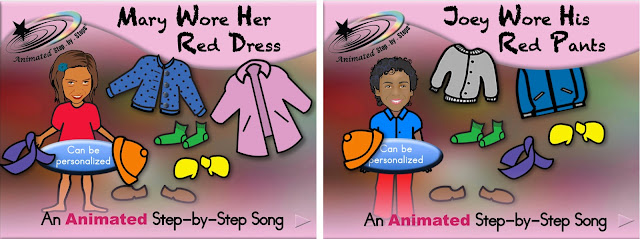
In many ways these resources are reflective of what I've learned in 5 years of developing educational resources using PowerPoint! Each resource offers two distinct interactive activities …. identifying colors and identifying articles of clothing. It also provides a forum for pronouns and name/ letter identification. 


General Instructions:

When using this resource I usually read the page first, simultaneously adding one new clothing item to the page/slide using the starred animations. In the process students are invited to find a particular clothing item in a three-choice array, e.g. "green socks"  "yellow mitts"

If correct, the requested clothing item will disappear from the choice array and reappear on either Mary/Joey. The item's name is announced. 

If incorrect, a mildly negative comment ('huhugh') is heard, and the student is encouraged to "try again".

Personalizing Your Resource to Heighten Student Interest

Instructions are provided to personalize this resource. If you are providing Tele-practice, personalization is  a great way to heighten interest and keep your student(s) engaged. 


Implementing Differentiated Instruction

The downloaded version offers a colored text cue, 'setting the stage' for an color matching task. If you wish to conduct a more difficult activity, i.e., identifying the item without the benefit of a color cue, simply drag the colored text 'off slide'. 
DO NOT eliminate the text … just move it to a location where it will not be seen when triggered in the animation sequence. 


The song can be sung during morning meeting. Children take turns choosing  an article of their clothing to sing about. " Jenny … what would you like to sing about today?  Your pants? Or your top?   Your pants? Okay what color is Jenny's pants? That's right! Let's sing about Jenny's red pants. Is Jenny a boy or a girl? A girl … that means we say her (not his).  A slide is included to visually support this extension activity.  Use thePowerPoint Pen tool to write in the child's name and circle the color, pronoun and clothing item. 


Tele-Practice

The revised format is more amenable to interactive tele-practice. The three choice array includes numbers to facilitate choice-making (when able to recognize numbers and unable to directly access the buttons due to distance learning). "choice 1 … or 2 ..,. or 3. You pick; I'll press"


Adding a Literacy Component

Personalize your resource with photo faces your class.  The educator can use the PowerPoint pen tool (comman p or Right click p while in presentation mode) to provide the class with a hint to guess the identity of the mystery student (that has not yet been animated to appear on the slide/page). 


The type of clues provided can be tailored according to student needs.
e.g. Our mystery student's name starts with the letter 'R'  (Randy)
e.g. Our mystery girl's name starts with the 'mmmmm' sound  (Maggie)
e.g.  Here's a hint …. B __  __ t (Bret)
e.g.  Our mystery person's name rhymes with 'fan'  (Sam)

I then invite students to sing the verse using the song button to set the pace. As we sing the page/slide, the facilitator follows along, pointing to either the text or the symbols (depending upon the version purchased). 

As always there are three versions of these resources: Regular, PCS and SymbolStix. Resources can be displayed on the 'big screen' (interactive whiteboard, large screen TV using Apple TV) or the 'small screen'  (computer monitor, iPad/Android tablet or iPhone using the free Microsoft PowerPoint app specific to each). 

…’til the next post …  

Visit my website   http://animatedstep-by-steps.com
Follow me on twitter www.twitter.com/@AnimStepbySteps
Follow me on facebook www.facebook.com/AnimatedStepBySteps
Email me canadiangoosse@gmail.com

©2020 Carol Goossens’, Ph.D.
Augmentative Communication Consultant
Special Educator

Sunday, May 10, 2020

Games, Games, Games! Tele-Practice Anyone?


During these difficult times, families are grappling with how to use their time together productively … and enjoyably. Some of my fondest childhood memories were playing board games in the evening with my siblings and Dad. In addition to being fun, games like Connect 4, Dominoes, Checkers, Rock Paper Scissors, Go Fish, Beat the Clock, WarI Spy With My Little Eye, Tic Tac Toe and even Pig Latin, provide a wonderful forum for teaching a variety of skills (numbers, colors, matching, foresight, letters, memory and spelling to list a few).

Animated Step-by-Steps® are animated PowerPoints designed to address literacy, language, AAC and a host of academic goals. Each page includes a series of animations. Read the text up to the star … click … and see an animation of what you just read. If you purchase a symbol-supported version, the symbols will appear AFTER all the slide animations have been triggered. This strategy is designed to promote a 'literacy first' agenda. Once the symbols appear they can be used to conduct Aided Language Stimulation. 

Over the past few years, I have gradually added How to Play Animated Step-by-Steps® to the vast library of animated resources. This 'How To Play' Series is designed to teach the rules of various 'family-orientated games'. In addition to outlining the rules, they also provide practice trials to ensure that children understand the rules. 

In the home, these resources can be displayed on the 'big screen'(large screen TV using Apple TV) or the 'small screen'(computer monitor, iPad/Android tablet or iPhone using the free Microsoft PowerPoint app specific to each). 

Please visit the Animated Step-by-Steps blog for further information on the creative use of these educational resources.     http://animatedstepbysteps.blogspot.com

In the hands of a creative parent, specific adaptations can be implemented to allow children to participate more fully in these games using an eye-gaze frame, a communication device or even a switch to trigger the sequential animations that make up each resource. 

They can even be shared via Tele-practice! The rules of the game are systematically shared using the share screen feature of a program such as Zoom, Skype or Google Team.  Communication training can set the stage for an interactive game. The child's communication device can be programmed with messages to mediate the game. 

These teaching resources are available through TpT. They can be purchased individually or bundled.  https://bit.ly/BigHow2PlayBundle