Wednesday, December 14, 2016

Games, Games, Games!

Games are a fun way to promote peer-peer interaction. There are currently four Animated Step-by-Steps® (sold individually or bundled) that fall into the category of interactive games. Most game titles strive to teach the basics of the game and provide preliminary practice. All titles are available in three formats: Regular (no symbol support), SymbolStix (n2y) and PCS (Tobii/Dynavox).

Rock Paper Scissors
This game introduces the three hand signs for the game and provides students with a series of increasingly more challenging practice sessions to teach the rules   …. rock beats (crushes) scissors … scissors beats (cuts) paper …. paper beats (covers) rock.


Beat the Clock
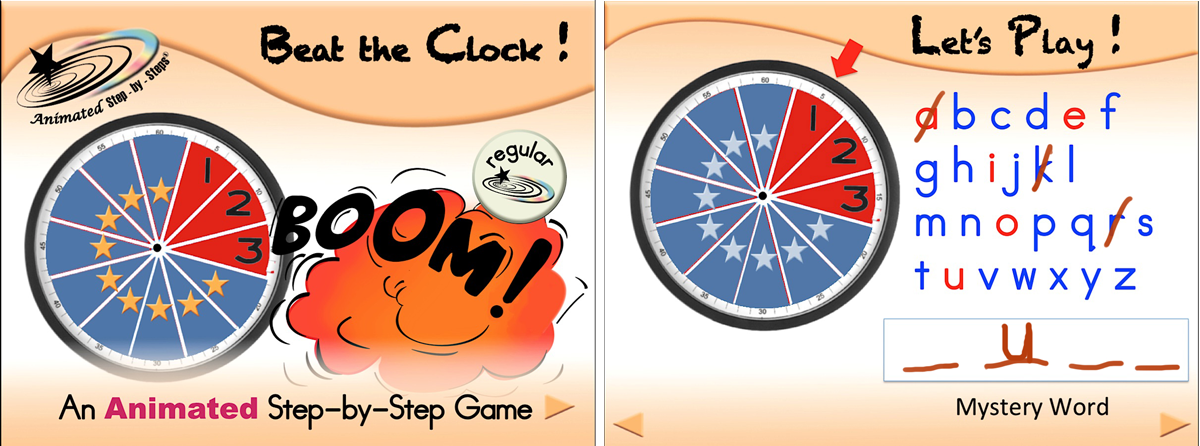
This digital variation of Hangman Game is a lot of fun. Students take turns guessing letters in a ‘mystery word’. The interactive whiteboard pen tools are used to add or mark off guessed letters. If the clock wins 12 rounds (12 incorrect guesses have been accumulated) …. Boom … the clock wins! More detailed information is provided in a previous post.


CVC Mystery Balls
This title is a digital version of a commercially available resource that is unfortunately no longer available. You are, however, able to reconstruct a physical facimile of the game, if you desire a ‘hands-on’ version. Students choose a colored ball …. the ball rolls out …. a mystery sound is heard …. the ball is opened to reveal the mystery object …. Students are encouraged to spell out the CVC word for the mystery object.  This resource addresses color words and CVC words. For further information on this digital game, visit this previous post.

I Spy With My Little Eye

I spy with my little eye something that is (red).  This digital version of the game displays clothing items of various colors and urges students to find a particular color. The end of the telescope provides a hint making the task essentially a matching task. If you wish to make the task more difficult for your students you can move the colored circle off page. This resource works on color concepts and clothing. For further information on the I Spy Game, please visit this previous blog post. http://bit.ly/2cwWY2i 


…’til the next post …  (new posts every Monday)

Visit my website   http://animatedstep-by-steps.com
Follow me on twitter www.twitter.com/@AnimStepbySteps
Follow me on facebook www.facebook.com/AnimatedStepBySteps
Email me canadiangoosse@gmail.com

©2016 Carol Goossens’, Ph.D.
Augmentative Communication Consultant
Speech-Language Pathologist
Special Educator

Thursday, December 1, 2016

Beat the Clock!

Beat the Clock is a variation of the Hangman Game. I prefer this variation as it is less gruesome  : )   and it conveniently reinforces the concept of 12 numbers on the clock. This resource available in three formats (regular, PCS, SymbolStix) from the Teachers Pay Teachers site, displays well on an interactive whiteboard and who doesn’t love those pen tools for marking the page!  http://bit.ly/2fNJmjn 


You can also use this resource on an iPad as the Microsoft PowerPoint app does have a pen tool that you can access by tapping the very top of the page while in presentation mode. You do have to ‘toggle back and forth’ between ‘pen’ and ‘no pen’ settings so vigilant coordination is required.


The game is initiated by first delineating the number of letters in a mystery word. The letter count is denoted as a series of horizontal lines at the bottom of the mystery word box. Students take turns (round robin) guessing a letter that they think might be in the mystery word.

An alphabet chart is provided on the Powerpoint slide to assist students with letter recall. Some teachers also give each student their own alphabet chart to manage as the game is played. The vowels on the chart are displayed in red; the consonants are blue to heighten this important distinction.

If the guessed letter is correct, it is written on its corresponding line in the mystery word.

If the guessed letter is incorrect, (Tick tock, no it’s not!) the next pie-shaped section of the clock is tapped to reveal the ongoing number count. Students have 12 chances to guess the mystery word before Boom! the clock runs out and the clock wins that game.

After each guess, correct or incorrect, the  pen tool is used to mark a slash across the letter to keep an ongoing record of what letters have already been guessed.

Although there are a variety of ways to conduct this literacy activity, a paradigm of ‘the class’ against ‘the clock’ is a great way to encourage team spirit and lots of peer-peer interaction (“You already guessed that one.  Yay team! Guess a vowel. ) A chart is provided to keep score over time. In many classrooms this activity was conducted just about every day.  Teachers usually print out ‘hard copy’ of the score chart page and display it next to the interactive whiteboard. The chart then becomes a math activity!

Students who are functionally non-speaking should have access to a system that allows them to participate in the Beat the Clock game. 

In this picture a little boy is using his head switch to scan key phrase-based messages and an encoded eye-pointing system to guess letters. To select a letter, he eye-points to the target letter, presented on the frame as a pair. To further delineate which of the paired letters he desires, he looks up/down or left/right, depending on whether the pair is horizontal or vertically presented on the frame.


For further information check out the resource, Constructing an Eye-Gaze Frame on the Teachers Pay Teachers site. http://bit.ly/2g37RON


Be creative! 


…’til the next post …  (new posts every Monday)

Visit my website   http://animatedstep-by-steps.com
Follow me on twitter www.twitter.com/@AnimStepbySteps
Follow me on facebook www.facebook.com/AnimatedStepBySteps
Email me canadiangoosse@gmail.com

©2016 Carol Goossens’, Ph.D.
Augmentative Communication Consultant
Speech-Language Pathologist
Special Educator

Monday, November 21, 2016

More on Shadow Light Cuing

Shadow Light Cuing was previously discussed as an excellent way to unobtrusively nurture expressive communication. http://bit.ly/shadowlightcue. This clinical strategy is most effective when working in a group where the Primary Facilitator is creating numerous communicative opportunities and Secondary Facilitators (e.g. personal assistant, assistant teacher, speech-language pathologist, occupational therapist, volunteer) are serving as the ‘silent coach’ providing a hierarchy of light prompts to assist students in capitalizing on these communicative opportunities. For more information on the benefits of a Primary-Secondary Facilitator Model please refer to this previous blog post,  http://bit.ly/Primary-Secondary

I recently found an LED keychain flashlight that I am thrilled to say works great for shadow light cuing. Just do an internet search for Home Kitty LED flashlight and several sources will appear with considerable variation in their pricing.


…’til the next post …  (new posts every Monday)

Visit my website   http://animatedstep-by-steps.com
Follow me on twitter www.twitter.com/@AnimStepbySteps
Follow me on facebook www.facebook.com/AnimatedStepBySteps
Email me canadiangoosse@gmail.com

©2016 Carol Goossens’, Ph.D.
Augmentative Communication Consultant
Speech-Language Pathologist

Special Educator